As an Amazon Associate I earn from qualifying purchases. Links below are affiliate links, which means I may earn a commission at no extra cost to you.
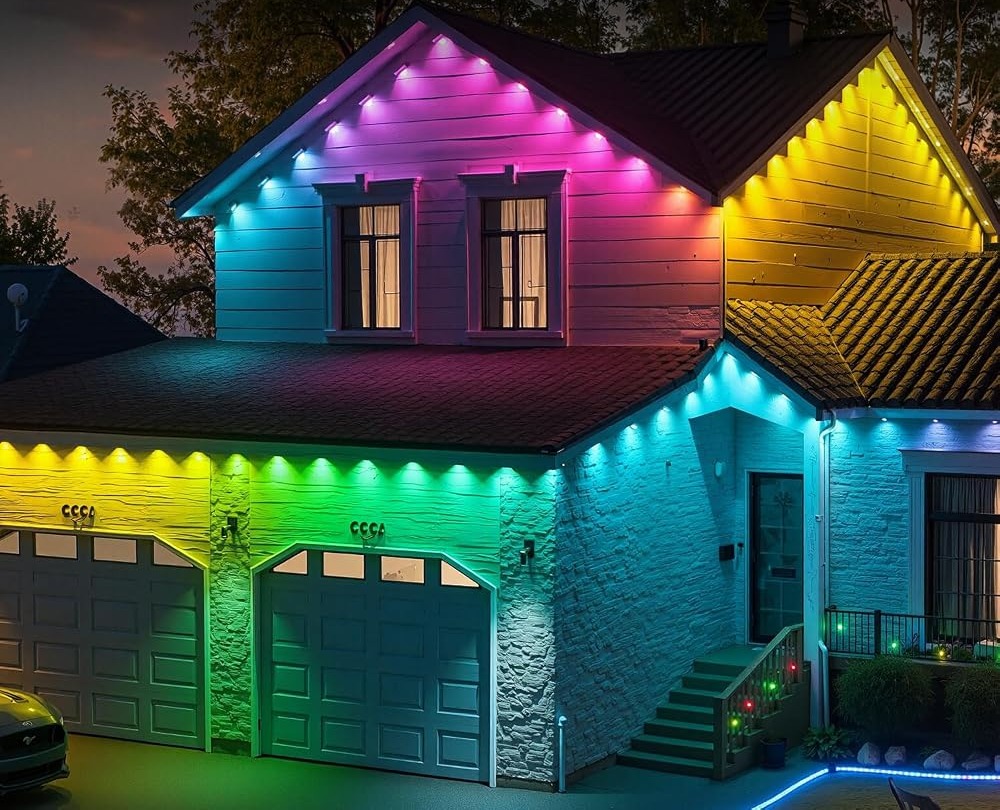
Gradient outdoor lighting is a smooth blend of color across a run, rather than a hard split between two blocks. On a 100ft eave line, that difference is obvious from the street: a gradient looks like a single considered idea, while a hard split looks like two displays joined together. Because this RGB+IC set gives each of its 50 LEDs individual control, it can carry a shade gradually from one end to the other. This guide explains how per-pixel control makes that possible, which modes produce a clean sweep, and when a simpler two-tone look is the better choice.

Quick answer
Gradient outdoor lighting relies on per-pixel control: neighboring LEDs can hold slightly different colors, so a shade can drift along the eave instead of jumping. Standard RGB cannot do this because the whole strip changes at once. With up to 16 million colors and 234 dynamic modes, this set has both the palette and the effects to make a smooth sweep. Check the current price on Amazon.
How gradient outdoor lighting works
A gradient is built from small steps. Instead of one instruction for the entire strip, the controller gives each LED a slightly different value, so blue at one end flows through teal into green at the other. The more gradual the steps, the smoother the result. This is only possible with individual control per pixel, which is the defining feature of RGB+IC.
Color depth matters as much as control here. To make a gradient look natural, the controller needs access to many intermediate shades; a limited palette would show visible bands. What 16 million colors really means explains why a deep palette is what lets a sweep stay smooth rather than stepping between a few fixed hues.
On a 100ft run with roughly two feet between LEDs, the eye blends the steps from across the street. That distance is an advantage: a gradient that looks slightly stepped up close often reads as a smooth wash from the driveway.
Which modes produce a clean sweep
Not every effect labeled as a gradient behaves the same way. A clean sweep holds two nearby shades and moves the boundary slowly; a poor one slams a hard edge across the run. When sampling modes, look for:
- A slow transition rather than a flashing change.
- Two or three related tones, not a full spectrum.
- A pattern that settles, so the roofline is not in constant motion.
- Moderate brightness, so the blend reads without glare.
The LotusLamp X app lets you adjust speed and brightness, which is often enough to rescue a mode that looks too aggressive. Keeping the tones close together is the simplest rule. Among the 234 dynamic modes, a handful of slow fades will do most of the work; the faster ones are better saved for occasions than used as an everyday gradient.
Gradient versus two-tone and holiday palettes
A gradient is not always the right answer. On a short segment, a clean two-tone split can look more deliberate than a long blend that has no room to develop. The choice also depends on the season. For everyday evenings, a subtle warm-to-white gradient suits most facades; for December, a red-to-green sweep reads as festive without needing a separate display. Holiday light colors for every season gives palettes that carry through the year from one set.
The same thinking applies to curb appeal. Light color tips for better curb appeal covers which tones photograph well and which wash out, and a gentle gradient in a restrained palette usually flatters a house more than a vivid one. A gradient works best when it supports the architecture rather than competing with it.
Building and saving your own sweep
Once you find a gradient you like, save it in the app. The LotusLamp X controls let you set color, brightness, speed and sequence, then schedule the look with the built-in timer. A saved sweep becomes a dependable everyday setting rather than something you rebuild each evening. Starting from a preset and tuning the two endpoint colors is faster than building from scratch. A named sweep is easier to recall than a string of numbers, so give it a label you will recognize next season.
If you want to assemble a full display around that sweep, build a DIY light show in five steps walks through choosing a base color, adding a second, and scheduling the result. A gradient is often the finishing touch once those basics are in place.
What to check before you buy
Gradients reward buyers who value a composed, permanent look over constant movement.
- Confirm per-pixel control and a deep color palette are stated.
- Check that speed and brightness are adjustable in the app.
- Plan a sheltered spot for the rainproof control box and adapter.
- Make sure an outlet sits near the start of the run.
- Treat IP67 as the seller’s stated rating and keep the adapter dry.
- Read the up-to-50,000-hour life figure as a listing estimate.
FAQ
Does a gradient need more LEDs?
More pixels make finer blends, but a long run viewed from a distance does not need extreme density. On a 100ft eave, the 50 individually controlled LEDs are enough for a smooth-looking sweep from the street.
Why does my gradient look like bands?
Bands appear when the available shades are too limited or the brightness is too high. Lower brightness and choose two closer tones; the app’s color and brightness controls are usually enough to fix it.
Can I schedule a gradient to run automatically?
Yes. The built-in timer can start and stop the display at set times, so a saved sweep can greet dusk and switch off late without nightly input.
Gradient outdoor lighting shows what per-pixel control and a deep palette can do together on a long eave. If a smooth, year-round look appeals to you, see the RGB+IC eave lights on Amazon to review the current set.
Views: 0