As an Amazon Associate I earn from qualifying purchases. Links below are affiliate links, which means I may earn a commission at no extra cost to you.
RGBIC outdoor lights are often described as an upgrade over RGB, but the label means little until you see what changes on the wall. IC stands for individual control: each LED on the strip can show its own color at the same moment. Standard RGB is limited to one color across the whole run, so the best it can do is change everything together. This article explains the practical difference, where chasing and multi-color effects look good on a home, and how many options are actually worth using. A 100ft run with 50 individually controlled pixels makes a useful example.

Quick answer
RGBIC outdoor lights let each pixel carry a different color at once, which is what makes chasing, flowing and multi-color displays possible. Standard RGB changes the entire strip to one color at a time. On the XINKAITE 100ft set, that control pairs with 234 dynamic modes and up to 16 million colors. Check the current price on Amazon.
What RGBIC outdoor lights do differently
Think of a standard RGB strip as a single light with a color dial. One command changes the whole run, so every point matches. That is fine for a steady wash of color along a roof edge, and it is simpler to live with if you only ever want one look.
An RGBIC strip gives each LED its own address. One pixel can be blue while its neighbor is warm white, and the colors can move along the run. That is the whole distinction: not more brightness, not a different bulb shape, but independent control per pixel. It is the reason a product can offer chasing effects at all.
The trade-off is complexity. More control means more choices in the app, and a buyer who wants a single steady color will use few of them. For the broader context, start with the permanent outdoor lights buying guide.
Chasing and multi-color effects explained
Chasing is a pattern that travels along the strip: a bright segment moves forward while the pixels behind it fade. Because each LED is controlled on its own, the effect looks like motion rather than a whole strip blinking. Multi-color-at-once is the simpler cousin — several colors sitting side by side, held in place.
Where these effects work:
- Along a long front roofline, where the eye follows movement from the street.
- Around a porch or garage outline, with a slow speed so the pattern reads cleanly.
- During a party or holiday, when a lively display is the point.
They work less well on a short segment viewed up close, where stepping between pixels looks abrupt. A practical guide to color changing lights covers picking presets that suit a front exterior.
234 modes and 16 million colors in practice
The numbers sound large: 234 dynamic style modes, 33 scene modes, and up to 16 million DIY colors. In daily use you will probably settle on a handful. The useful approach is to sample the modes once, save the ones that look right from the street, and ignore the rest.
Color depth matters more than mode count for a subtle look. Sixteen million colors gives you room to dial in a soft amber or a muted blue instead of a harsh primary. Paired with per-pixel control, that means a gradient can run the length of the eave rather than jumping between two blocks of color. More modes is not automatically better; a slow, well-chosen effect usually reads better than a fast one. For control details, see which app-control features actually matter.
Where per-pixel control earns its keep
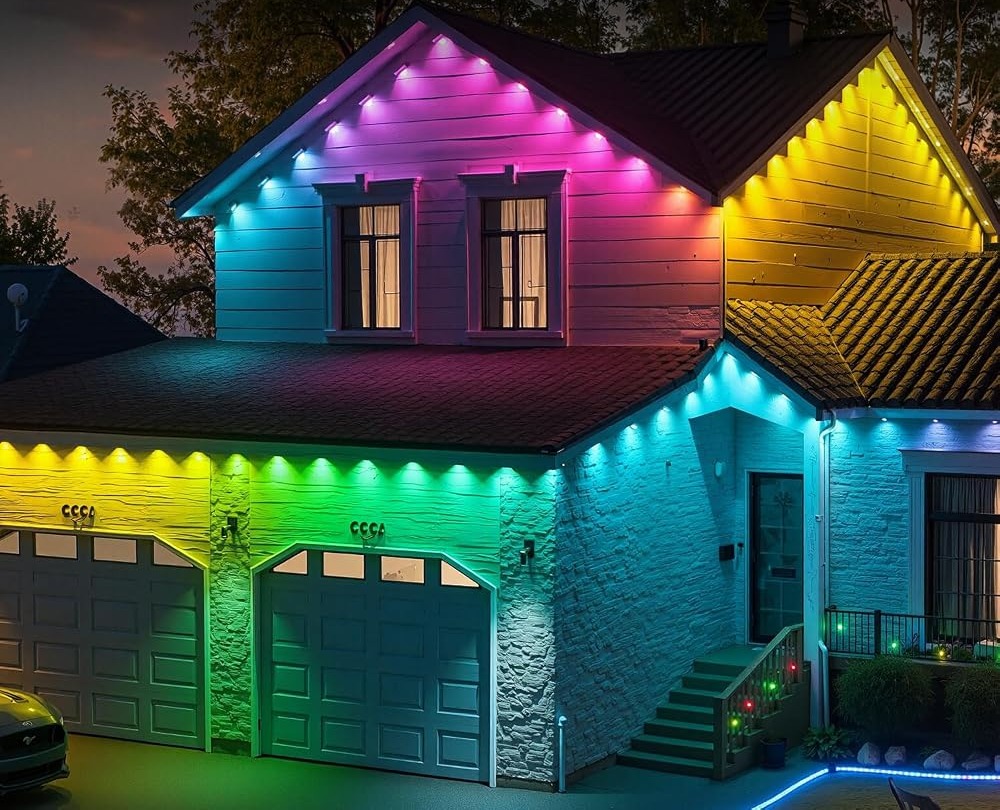
Per-pixel control is most valuable where the strip is long and visible from a distance. A front roofline is the ideal case: the run has room for a pattern to develop, and the whole outline is seen at once. A garage door frame is another good spot, especially with a slower effect.
It is less useful on a small, tucked-away segment where one color would look cleaner. There is also a practical limit. With pixels roughly two feet apart on a 100ft run, fine detail is not the goal. Broad sweeps and clean two-tone splits look intentional; intricate patterns do not. If you are still weighing smart features, what to look for in smart outdoor lights sets out the checklist.
What to check before you buy
RGBIC outdoor lights reward buyers who will actually change the display.
- Confirm the pixel count and spacing for your mounting height.
- Check that per-pixel control, not just color changing, is stated.
- Plan a sheltered location for the rainproof control box and adapter.
- Confirm an outlet near the start of the run.
- Treat IP67 as the seller’s rating and keep the adapter dry.
- Read the 50,000-hour life figure as a listing estimate.
FAQ
Is RGBIC the same as RGB?
No. Standard RGB shows one color across the entire strip at a time. RGBIC gives each LED independent control, so several colors can appear at once and effects can travel along the run. If you only want one steady color, the difference will not matter much to you.
Do I need the app to use the effects?
The included remote covers basic on/off and common functions, while the LotusLamp X app opens up custom colors, brightness, speed, sequence, music sync and the timer. You can still use the set without exploring every option, which suits anyone who wants a simple display.
Will chasing effects bother the neighbors?
They can if left fast and bright late at night. Slow the speed, lower the brightness in the app, and use the built-in timer to cut the display at a reasonable hour. A calm two-tone look is usually better after dark than a fast-moving pattern.
RGBIC outdoor lights are worth considering when you want a display that changes with the season rather than a static outline. Match the pixel control to how you will use it. If that sounds like your home, see the RGB+IC eave lights on Amazon to review the current set.
Views: 0