As an Amazon Associate I earn from qualifying purchases. Links below are affiliate links, which means I may earn a commission at no extra cost to you.
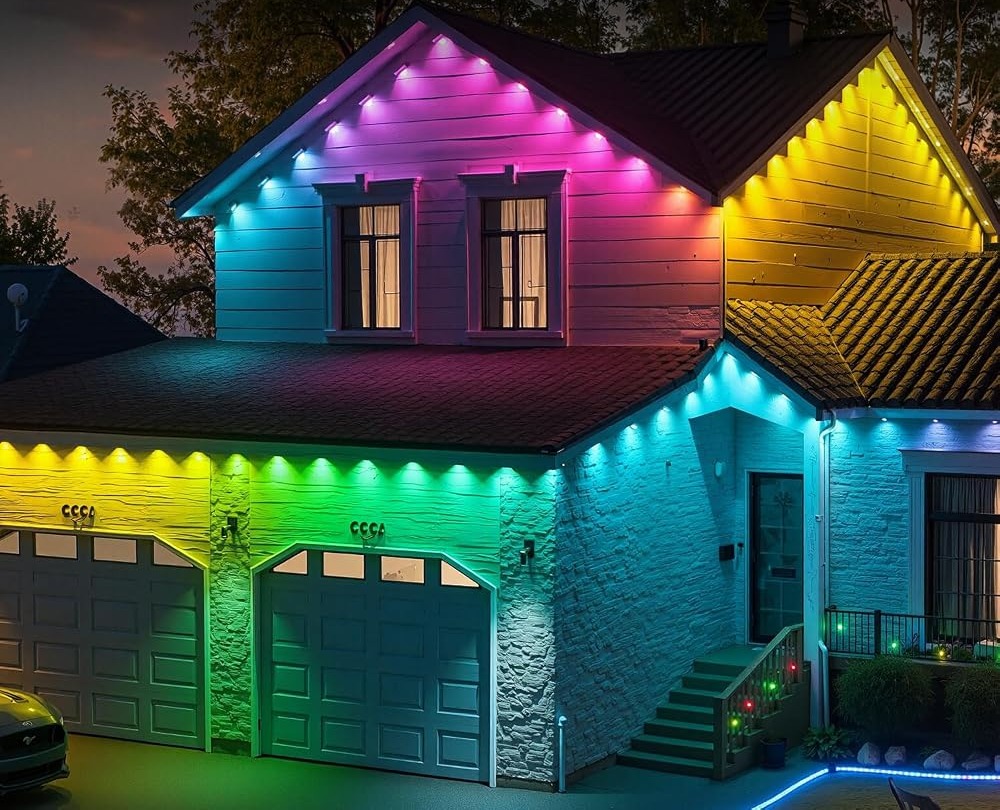
A light timer schedule is the difference between a permanent eave display you enjoy and one you keep forgetting to switch on. The built-in timer on this 100ft RGB+IC set lets you decide when the 50 LEDs come on and go off, then removes you from the routine. Used well, it also keeps a bright facade from running all night. This guide covers a simple weekday and weekend plan, how to combine the timer with the 33 scene modes, and what to do when a schedule misbehaves. I will be clear about the limits too, including the moments when the included remote is the better tool.
Quick answer
Set the timer in the LotusLamp X app to switch the lights on near dusk and off at a fixed hour, then leave it alone. Weekday and weekend schedules can differ, so you are not locked into one routine. Save a calm look first, then schedule that. Check the current price on Amazon.
Build a light timer schedule for the week
The timer lives in the app, so the first step is a working pairing. If that is still ahead of you, the LotusLamp X app walkthrough covers setup and the controls you will use. Once connected, create one on event and one off event. An on time near dusk means the display appears when it is useful; a fixed off time means it does not run unattended until morning. Two events are enough for most homes.
The weekly pattern is where the timer earns its place. A weekday routine can be shorter, ending early on working nights. A weekend routine can run a little later when people are outside. Keep the difference small; a drastic change means two schedules to remember. Give a new schedule a few evenings of checking before you trust it fully. If the lights are still on when you go to bed, move the off time earlier rather than adding more events.
A sample weekday and weekend routine
Here is a plain starting point you can adjust to your own hours and latitude.
| Day group | On | Off | Look |
|---|---|---|---|
| Monday to Friday | Near dusk | Mid-evening | One calm saved color |
| Saturday | Near dusk | Later evening | A gentle scene mode |
| Sunday | Near dusk | Mid-evening | Same calm color as weekdays |
The exact clock times depend on where you live and how late you use the space. The point is structure, not precision. Notice that the look stays similar across the week. That keeps the house consistent from the street, which usually looks better than a different display every night. Adjust the on time as the season changes; a clock time that suited June will feel late by December. Recheck the schedule at each change of season rather than assuming it still fits. If you want to go further with variations, the simple routines guide builds on this same timer.
Pairing the timer with scenes and brightness
A schedule controls when the lights run; scenes and brightness control how they look during those hours. Set those before you finalize the timer, because a scheduled display you dislike is worse than no display. Choose a subdued scene from the 33 available modes, then drop brightness a step. On a light-colored facade, a lower setting reads as intentional rather than harsh. App controlled christmas lights shows the same idea across a holiday season, where a display changes by occasion without going outside.
Music sync deserves a warning here. It is a fine choice for a party evening, but scheduling it to run every night becomes tiring quickly. Keep the routine calm and treat reactive effects as a manual, temporary change. The timer should protect the everyday look, not amplify the loudest setting.

When the schedule misbehaves
Most timer problems are simple. If the lights ignore a schedule, check that the events are saved and that the control box has power from the 24V adapter. If a look changes unexpectedly, a manual adjustment may have overridden the saved setting; reapply the saved scene, then recheck the timer. Keep the phone near the control box while making changes so the app responds quickly.
While you sort it out, the remote is your fallback. It handles on/off without opening the app, so the display never has to stay on all night because a schedule failed. Why the physical remote still helps covers that situation and a few others worth planning for. A saved schedule also survives a phone restart, which is worth confirming during setup so you are not caught out later.
What to check before you buy
A scheduled display suits someone who wants the lights handled automatically. It is a weaker fit if your evenings vary so much that no fixed off time works.
- Confirm the app includes a built-in timer, not only manual control.
- Check that separate weekday and weekend routines are possible.
- Make sure a physical remote is included for manual override.
- Plan a sheltered location for the rainproof control box and adapter.
- Treat IP67 as the seller’s stated rating, not a promise for every storm.
- Read the up-to-50,000-hour life figure as a listing estimate.
FAQ
Does the timer need the phone nearby?
No. You set it in the app, then the schedule runs on its own. The phone is only needed when you want to change the events.
Can I run different looks on different days?
Yes. Save a few looks and apply them to separate routines, so weekdays and weekends can differ without rebuilding a setting each time.
What if I want the lights off early one night?
Use the remote for a quick shutoff. The saved schedule stays intact for the following evenings.
A timer turns a permanent run into a set-and-forget feature. Save a calm look, set sensible on and off hours, and let the schedule do the work. If that is the kind of low-effort control you want from a 100ft RGB+IC eave set, see the lights on Amazon.
Views: 0