As an Amazon Associate I earn from qualifying purchases. Links below are affiliate links, which means I may earn a commission at no extra cost to you.
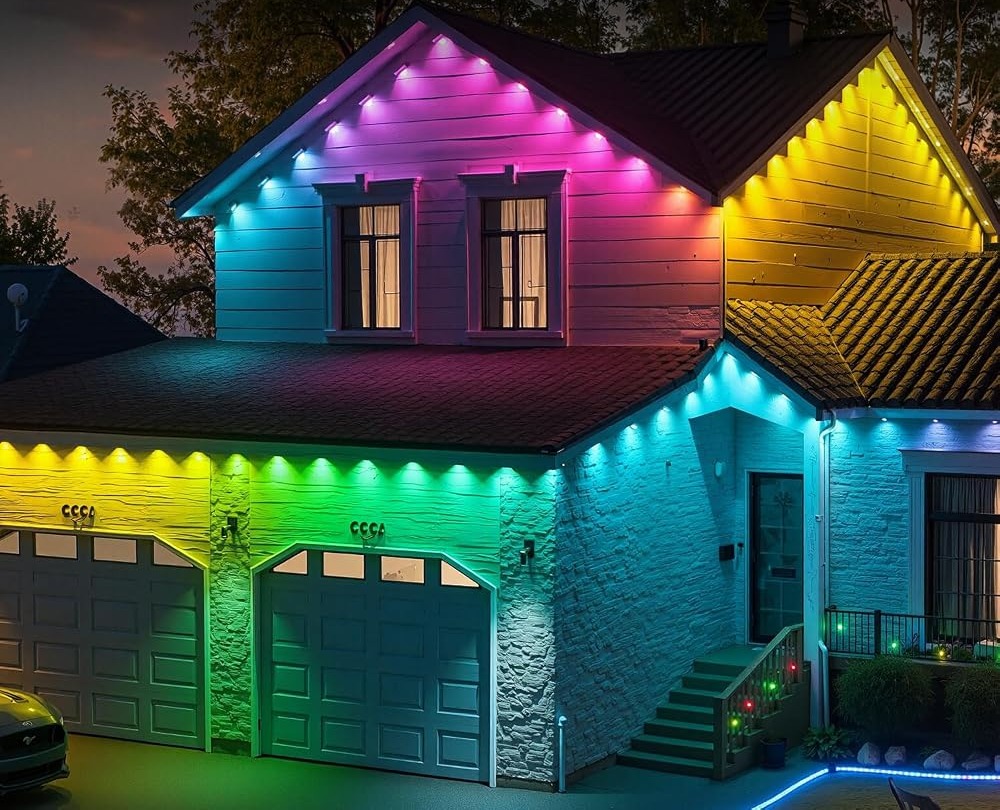
Learning to control outdoor lights from your phone is the part of a permanent eave install that rewards a few patient minutes at the start. This 100ft RGB+IC run uses the app to reach all 50 individually controlled LEDs, along with the 234 dynamic modes and 33 scene modes they carry. Once paired, everyday changes are a few taps: a color, a brightness level, a timer. This quick guide covers the first pairing, the controls you will actually use, and what to do if the connection drops. It is a practical guide rather than a spec sheet, with an honest note on when the included remote is the better choice.
Quick answer
Install the app, power the control box from the 24V adapter, and add the device while the phone is nearby. Then use the app for color, brightness, speed, sequence, scenes and the timer. The remote covers quick on/off. Check the current price on Amazon.
How to control outdoor lights from your phone
The first session is short if you do it in the right order. Keep the phone close to the control box, because proximity makes pairing smoother. Then:
- Install the app and create any account it asks for.
- Power the control box from the 24V adapter.
- Add the device through the app’s prompts and wait for it to connect.
- Send a simple on/off command to confirm the lights respond.
- Only then move on to color and scene changes.
That fourth step matters. It is far easier to fix a pairing problem while the control box is within reach than after the run is stuck to the eave. The listing says the control box and adapter are rainproof but should be sheltered from direct water, so choose that spot before you finalize the mount. Do this setup before the weather turns cold, since working with a phone and a control box under a dark eave is no one’s idea of a good evening. The LotusLamp X app walkthrough goes deeper on the interface if you want more detail after pairing.
The controls you will actually use
Most people settle on a handful of controls and ignore the rest. The 234 dynamic modes are generous, but a short list is enough for daily use.
- Color — from up to 16 million choices, or start with a preset.
- Brightness — the setting most often left too high on a light facade.
- Speed — slower effects read better from the street.
- Sequence — decides how colors travel across the 50 LEDs.
- Scenes — one tap to a coordinated look from the 33 built-in modes.
- Timer — sets on and off hours so the display runs on its own.
Brightness deserves special attention. Getting it right is more important than picking the perfect color, because an overly bright eave looks harsh no matter which hue you chose. The brightness control guide explains how to tune it for an evening look. Sequence is the control that makes per-pixel control visible; with it, colors travel along the eave instead of changing everywhere at once. That is worth understanding before you dismiss the long mode list as unnecessary.
Occasional features worth knowing
Two features sit outside daily use but are worth finding before you need them. Music sync makes the lights respond to the beat, which suits a patio gathering and not a quiet night. Set it up during a calm afternoon so you are not learning it mid-party; the music sync setup guide walks through the process. The other is the built-in timer. Set it once and the phone stops being necessary for the nightly routine, which is the quiet payoff of doing the initial setup properly.

If the connection drops
A dropped connection is usually minor. Bring the phone closer to the control box, confirm the box still has power, and try the command again. A quick restart of the app clears many temporary glitches, and re-pairing should be a last resort rather than the first response to a dropped command. If the app will not respond at all, the included remote still handles on/off, so the display never has to stay on all night. That fallback is a real advantage over app-only lighting. The troubleshooting guide covers pairing failures, unresponsive controls and forgotten schedules in more detail.
One honest limit: detailed changes always require the app. The remote is a fallback for basic control, not a replacement for color, sequence or scheduling.
What to check before you buy
Phone control suits someone comfortable with a short app setup. It is a weaker fit if you want every function available without a phone.
- Confirm the app is stated to include color, brightness, speed, sequence and a timer.
- Check that a physical remote is included for quick on/off.
- Plan a sheltered spot for the rainproof control box and adapter.
- Make sure an outlet sits near the start of the run.
- Treat IP67 as the seller’s stated rating, not a promise for every condition.
- Read the up-to-50,000-hour life figure as a listing estimate.
FAQ
Do I need a hub to use the app?
Nothing in the product description calls for a separate hub. The app connects to the control box directly; keep the phone close during the first pairing.
Can I use the lights if my phone is unavailable?
Yes, at a basic level. The remote handles on/off and common functions, so the display stays controllable without a phone.
Will a saved timer survive a phone restart?
Yes. The timer runs in the lighting system, so the schedule continues without the phone. The app is only needed to edit it.
Phone control is quick once the first pairing is done. Set the basics, save a calm look, then let the timer take over. If you want that arrangement on a 100ft RGB+IC eave set, see the current listing on Amazon.
Views: 0