As an Amazon Associate I earn from qualifying purchases. Links below are affiliate links, which means I may earn a commission at no extra cost to you.
Dynamic light modes are the animated presets that move color along a strip, and a list of 234 of them feels more useful than it is until you are standing in front of the app. The real task is shortlisting the handful you will actually repeat. On a 100ft RGB+IC run with 50 individually controlled LEDs, the best modes create a slow, clean sweep that reads well from the curb. This guide covers how to sample the options quickly, which speeds work from the street, and how to save favorites so the menu shrinks to something you can use.

Quick answer
Dynamic light modes are prebuilt animations stored in the controller, and this set offers 234 dynamic style modes alongside 33 scene modes. Most owners settle on a few slow effects for everyday use and keep faster ones for gatherings. The LotusLamp X app lets you adjust speed and brightness and save a favorite look. Check the current price on Amazon.
Making 234 dynamic light modes usable
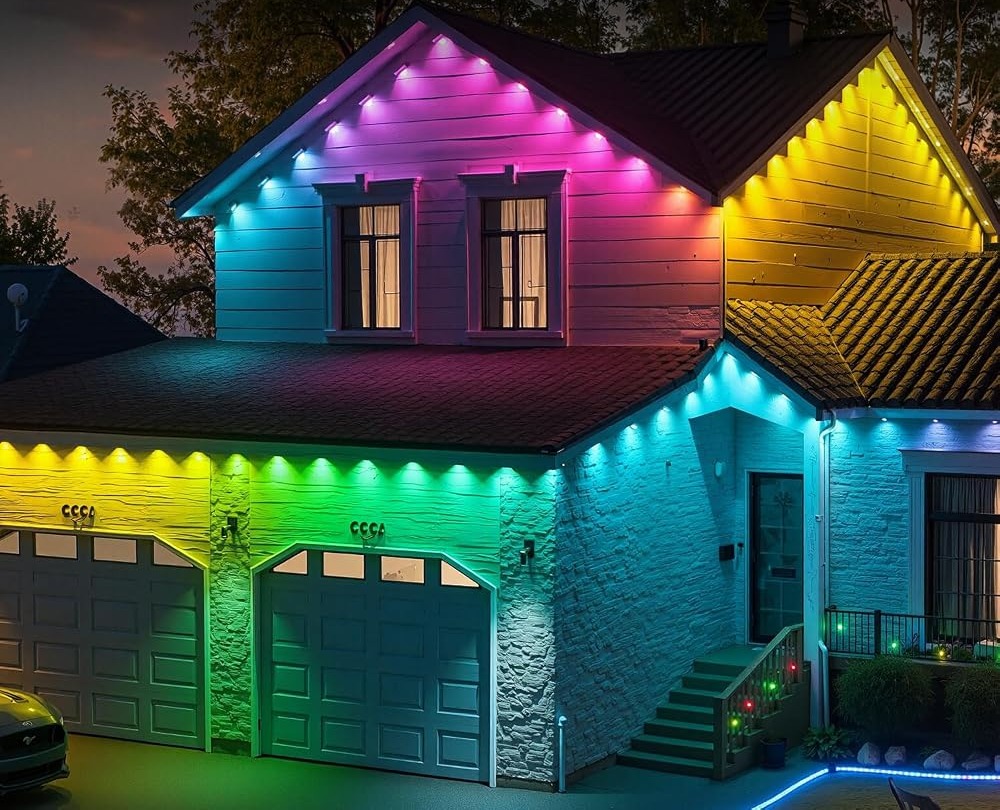
The number is a menu, not a to-do list. A sensible approach is to sample modes in short batches, keeping only those that look right from the street, where the display will actually be seen. Effects that seem dull on a phone screen can look composed on a long eave, and some that look exciting up close turn messy at a distance.
Judge each mode on three things: how fast it moves, how many colors it uses, and whether it settles or keeps cycling. A mode that holds two nearby shades and drifts slowly will get repeated; a rapid rainbow that never rests usually will not. Color depth is a separate question from mode count, and what 16 million colors really means explains why a deeper palette only helps when the effect itself is understated. Aim for a small set of reliable looks rather than a tour of all 234. A good rule is to keep no more than five effects in regular rotation; any more and choosing becomes a chore.
Slow effects versus fast ones from the street
From a driveway or sidewalk, motion reads differently than it does up close:
- Slow two-tone sweeps look deliberate and suit a front elevation.
- Medium-speed chases add life to a garage outline without seeming frantic.
- Fast multi-color cycles fit a party but draw attention late at night.
- Static scenes suit everyday evenings when you want the house to stay quiet.
Distance also smooths the steps between the 50 pixels, which is why a gentle drift can look better from across the street than beside the house. Keeping brightness modest helps the same mode read as elegant rather than loud.
One more factor is where you stand when you judge a mode. Standing beside the house shows every pixel transition; standing at the curb shows the overall effect. Judge from where the display will actually be seen, and you will save modes that look right in context instead of modes that merely look clever up close.
Dynamic modes versus scene presets
The two categories overlap, so it is worth knowing the difference. A dynamic mode is generally an effect that keeps moving, while the 33 built-in scene modes are complete looks you select as a single mood. For everyday evenings, a calm scene is often the better choice; for a gathering, a moving mode adds energy. The scene modes for lights, grouped by mood shows how to choose a preset that fits a front exterior without looking busy.
Think of dynamic modes as the spice and scenes as the main course. Installing a permanent set means the same lighting is seen for months, so a quiet default that you can dress up occasionally works better than a constant animation. Scenes tend to be the safer default for a front elevation, which is why they are worth setting up before you experiment with animation.
Pairing modes with color, music and the timer
A saved look becomes more useful when you connect it to the rest of the app. You can tune the underlying shade with custom colors matched to your exterior, so a favorite mode uses tones that complement the siding. For parties, music sync lights offer a different kind of motion that follows a beat instead of a fixed sequence. The built-in timer then schedules when the display starts and stops, which keeps a lively mode from running all night.
The included remote covers quick on/off when a phone is not handy, but the app is where the shortlist is built and saved.
What to check before you buy
A large mode list is most useful to buyers who will narrow it down once.
- Confirm the stated mode count and that speed and brightness are adjustable.
- Check that you can save a favorite look for repeat use.
- Plan a sheltered spot for the rainproof control box and adapter.
- Make sure an outlet sits near the start of the run.
- Treat IP67 as the seller’s stated rating and keep the adapter dry.
- Read the up-to-50,000-hour life figure as a listing estimate.
FAQ
Will I use all 234 modes?
Almost certainly not, and that is normal. The value is having enough variety to find a few that suit your house. Sample them once, save the best, and ignore the rest rather than feeling obliged to try each.
Which speed looks best from the street?
Slower is usually safer. A gentle drift reads as intentional on a long roofline, while a fast cycle can look frantic and draws attention late at night. Start low and raise the speed only for an occasion.
Can I schedule a mode to run automatically?
Yes. The app includes a built-in timer for scheduled lighting, so you can have a chosen look start at dusk and stop at a set hour. That is the simplest way to keep an animated display from running when no one is watching.
Dynamic light modes are easiest to enjoy when you treat 234 options as a starting point, not a checklist. If a flexible, year-round display fits your home, see the RGB+IC eave lights on Amazon to review the current set.
Views: 0