Most mobile puzzle games are in a hurry. A countdown sits in the corner of the screen, pieces keep dropping whether you are ready or not, and a five-minute break quietly turns into a small stress test. Block Blast takes the opposite approach. It is a glowing, unhurried take on the classic block puzzle: drag shaped blocks onto an 8×8 grid, complete a full row or column to clear it, and see how long you can keep the board alive. There is no timer, no falling piece, and no penalty for thinking. If you have been looking for a puzzle game that actually feels like a break, this one deserves a closer look.
In this review, we walk through what Block Blast is, exactly how it plays, what its two game modes offer, and where it fits among the many free puzzle games on Google Play. We will also be straightforward about the free-to-play model, the ads, and the optional upgrade, so you know precisely what you are getting before you install it.
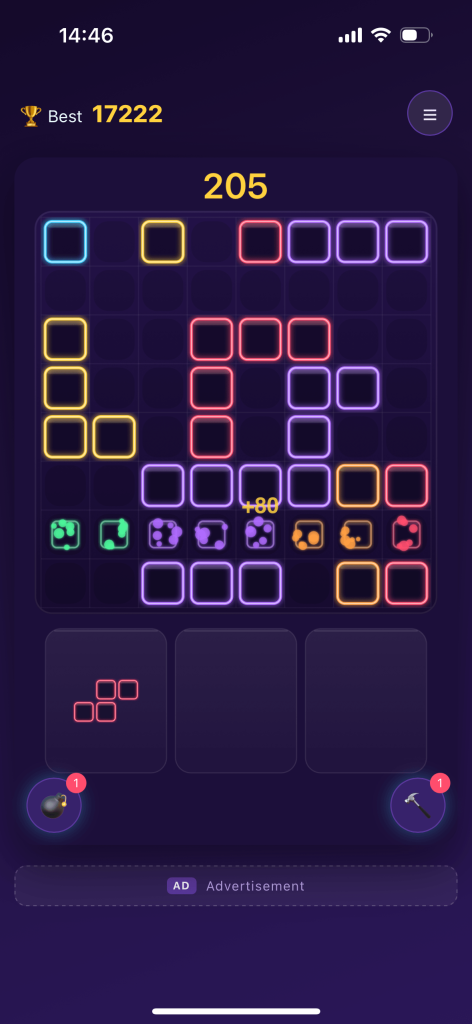
What Is Block Blast?
Block Blast is a casual block puzzle game developed and published by Shenzhen Jinjie Network Technology Co., Ltd. It is available free on Google Play under the package name com.jinjie.neonblast, runs on Android 7.0 and above, and is localized into English plus dozens of other languages. The install is small and lightweight, which matters more than it sounds on older phones or devices with limited storage.
At its core, the game belongs to the “block placement” family of puzzles. Rather than matching colors or swapping adjacent tiles, you are given a set of geometric shapes and an empty grid, and your job is to fit those shapes together so that they form complete lines. It is a direct descendant of the wooden block puzzles people have played for decades, rebuilt with a dark background and bright neon edges that make every cleared line feel like a small light show.
The premise is deliberately modest, and that is the point. Block Blast is not trying to be an action game, a narrative adventure, or a competitive esport. It wants to be the thing you open while waiting for a bus, and close again two stops later without having lost anything.
How to Play: The 8×8 Grid Explained
The rules are simple enough to learn in under a minute, but they create a surprising amount of depth.
Drag blocks from the tray onto the grid. A selection of shaped blocks sits below the board. You drag each one into position on the 8×8 grid. Once placed, a block stays where you put it until a line clears it.
Fill a full row or column to clear it. When every cell in any horizontal row or vertical column is occupied, that line disappears, freeing up the space. This is the only way to remove blocks from the board, which makes every placement a small bet on future space.
Clear multiple lines at once for combo bonuses. A single well-placed piece can complete a row and a column simultaneously, or even several lines at once. The game rewards these clears with combo bonuses, so setting up a multi-line clear is the main way to push a high score upward.
Blocks cannot be rotated. This is the rule that separates a thoughtful player from a lucky one. The shape you are given arrives in a fixed orientation, and you have to work with that orientation. You cannot turn a vertical piece into a horizontal one to squeeze it into a gap, so reading the tray and planning around the shapes you actually have is essential.
There is no timer. Nothing falls, nothing expires, and nothing rushes you. You can sit and study the board for as long as you like before committing to a move. Every decision can be a considered one.
The game ends when no block fits. Once the board is crowded to the point that none of the available shapes can be placed, the run is over. That single end condition gives the whole game its tension: you are not racing a clock, you are managing a finite, shrinking resource — space.
The combination of these rules is what makes the game quietly strategic. Because clearing is the only way to reclaim space, and because combos score better than single lines, you are constantly balancing the safety of a small clear now against the payoff of a bigger clear later.
Two Game Modes: Classic and Adventure
Block Blast splits its content into two modes, and they serve noticeably different moods.
Classic — endless, relaxing, pure strategy
Classic mode is the game in its purest form: an endless board, a steady supply of shapes, and your own high score as the only opponent. There are no levels to finish and no targets to hit. You simply play until the board fills up, then start again and try to beat yourself. Because there is no timer and no move limit, Classic is the mode most people will open for a few quiet minutes. It is also the best place to practice the space-management habits that make the rest of the game easier.
Adventure — 40+ handcrafted levels with obstacles
Adventure mode adds structure. It offers more than 40 handcrafted levels built around ice, wood, and stone obstacles that you need to smash through. Instead of an open-ended score chase, each level gives you a specific board and a specific problem to solve, which changes the way you think: the question is no longer “how long can I survive?” but “what is the right sequence of clears to break through this layout?”
The obstacle materials give the mode a gentle difficulty curve. Early levels teach you how blocks interact with obstacles; later ones ask you to combine careful placement with combos and well-timed power-ups. For players who want a sense of progress — a level completed, a chapter moved through — Adventure is the half of the game that delivers it. For players who just want to zone out, Classic remains a single tap away.
Having both modes in one small app is a genuinely useful design choice. It means the same install works for a two-minute wait and for a longer, more focused session, without forcing either type of player into the other’s experience.
Power-Ups: Bomb and Hammer
When a board gets tight, Block Blast gives you two tools to dig your way out.
The Bomb clears a 3×3 area. It is the right answer when a cluster of blocks has formed in one region and no available shape will fit around it. A single bomb can reopen enough space to resume normal play.
The Hammer smashes a single block. It is a precision tool rather than a rescue tool — ideal for removing the one stubborn cell that is stopping a row from completing, or for carving out a gap that exactly matches an awkward shape in your tray.
You earn power-ups by clearing lines, which is a nice bit of design: the better you play, the more emergency options you build up. It also creates a natural decision point. Spending a bomb too early wastes a resource you might need three moves later, while hoarding it until the board is completely jammed may be too late. Learning when to cash in a power-up is one of the skills that separates a short run from a long one.
What Makes It Stand Out
A lot of block puzzle games share the same 8×8 rules, so the details are what matter.
- Vibrant neon visuals with satisfying effects. Dark boards and glowing shapes give every clear a crisp visual payoff. It is a small thing, but feedback is a large part of why puzzle games feel good to play.
- No time pressure. You play at your own pace, and there is no penalty for pausing to think. This is the single biggest reason the game works as a wind-down activity.
- Autosave — quit anytime and resume later. Your board is saved automatically, so closing the app mid-run does not cost you your progress. You can put the phone down the moment your stop arrives and pick up exactly where you left off.
- Plays offline — no Wi-Fi needed. The game does not require a connection, which makes it genuinely usable on commutes, flights, in subways, and anywhere else the signal disappears.
- An optional one-time Remove Ads purchase. If the ads get in the way, a single purchase removes them for an uninterrupted experience. It is a one-time upgrade, not a subscription.
Free to Play, Ads, and the One-Time Upgrade
It is worth being clear about the business model. Block Blast is free to download and play, and it contains ads. There is also an optional in-app purchase that removes ads permanently. That is the whole monetization story: no energy systems, no pay-to-win boosters, no required spend to keep playing.
The game also keeps things simple on the data side. Progress is stored on the device rather than behind an account, so there is no sign-up screen between you and your first move, and you do not need to hand over an email address to play. The developer publishes a privacy policy on its official site at https://www.ai-sp.cn/apps/neon-blast/privacy.html if you want the details before installing.
For a free casual game, that is a fair arrangement. You can play the entire thing without paying anything, and if you end up playing daily, the one-time upgrade is there as an option rather than a demand.
Who Is This Game For?
Block Blast fits a few groups particularly well.
Commuters and travelers. Offline play plus autosave is exactly the combination you want when your session will be interrupted without warning. Anyone who wants to decompress. The absence of a timer is not a missing feature; it is the feature. There is no adrenaline here, just a board and a sequence of small, tidy decisions. Fans of strategy and spatial reasoning. Because shapes cannot be rotated and the board never resets on its own, the game rewards planning ahead far more than quick reflexes. Players who like both short and long sessions. Classic handles the two-minute version; Adventure handles the “I have twenty minutes” version.
It is less suited to someone looking for multiplayer competition, a story, or fast reflex-based action. That is not a flaw — it is a clear statement of what the game is trying to be.
How to Get Started
Installation is about as frictionless as it gets: open the listing, install, and you are on the board within seconds. There is no account to create and no sign-in to work through. Start with Classic mode, spend a few runs getting a feel for how quickly the grid fills up, then move into Adventure once you want concrete levels to work through. If you want to shorten the learning curve, our block puzzle tips and high-score strategies cover the ten habits that make the biggest difference. And if you are simply trying to decide whether timer-free games are a better fit for your downtime, we put together a guide to relaxing, offline puzzle games with no time limit.
Ready to light up the board? Download Block Blast free on Google Play: https://play.google.com/store/apps/details?id=com.jinjie.neonblast
Frequently Asked Questions
Is Block Blast free to play? Yes. It is free to download and play, and it contains ads. There is an optional one-time in-app purchase that removes ads permanently. No purchase is required to play either game mode.
Can I play Block Blast offline? Yes. The game is fully playable without Wi-Fi or mobile data, which makes it a good pick for commuting and travel.
Is there a time limit? No. There is no timer in Block Blast. You can take as long as you want to consider each move, and the run ends only when none of the available blocks can fit on the grid.
Can you rotate the blocks? No. Blocks arrive in a fixed orientation and cannot be rotated. Planning around the shapes you are actually given is part of the challenge.
What is the difference between Classic and Adventure mode? Classic is an endless, relaxing score chase with no levels or targets. Adventure offers more than 40 handcrafted levels featuring ice, wood, and stone obstacles that you need to break through.
What do the power-ups do? The Bomb clears a 3×3 area and the Hammer removes a single block. You earn them by clearing lines, and they are best saved for moments when the board is close to jamming.
Will I lose my progress if I close the app? No. The game autosaves, so you can quit at any time and resume the same board later.
Who develops Block Blast? It is developed and published by Shenzhen Jinjie Network Technology Co., Ltd. The official game listing is on Google Play and the developer’s privacy policy is available at https://www.ai-sp.cn/apps/neon-blast/privacy.html.
Related reading: how block puzzles exercise spatial reasoning, why we chose a free game with no subscription and the studio notes behind a timer-free puzzle.
More from the studio: the Adventure mode guide, block puzzle vs match-3 explained and the Block Blast FAQ.
Further reading: games like Block Blast and how to choose an alternative and what defines a Block Blast-style 8×8 puzzle.
Views: 1