Some questions about a mobile game are too small to justify a whole article, but too important to leave to a store listing’s fine print. Is it actually free, or free until level ten? Does it need a connection on the train? Are the blocks rotatable? Will a half-finished board survive closing the app?
This page collects the questions people ask about Neon Block Blast and answers each one plainly, using only what is in the published game listing and what the game itself shows you. No speculation about future updates, no invented numbers, no features borrowed from other games with similar names. If a detail is not confirmed, we say so and point you to the official listing instead.
There are a few different games on Google Play with names close to this one, including a roguelite shooter with a similar title. Everything below refers specifically to Neon Block Blast by Shenzhen Jinjie Network Technology Co., Ltd., package name com.jinjie.neonblast. Checking the package name in the store URL is the fastest way to be sure you are looking at the right app.
For a narrative walkthrough rather than question-and-answer, see the Neon Block Blast review. For genre context, the comparison of block puzzles, match-3 and falling-block games explains where this kind of puzzle sits.
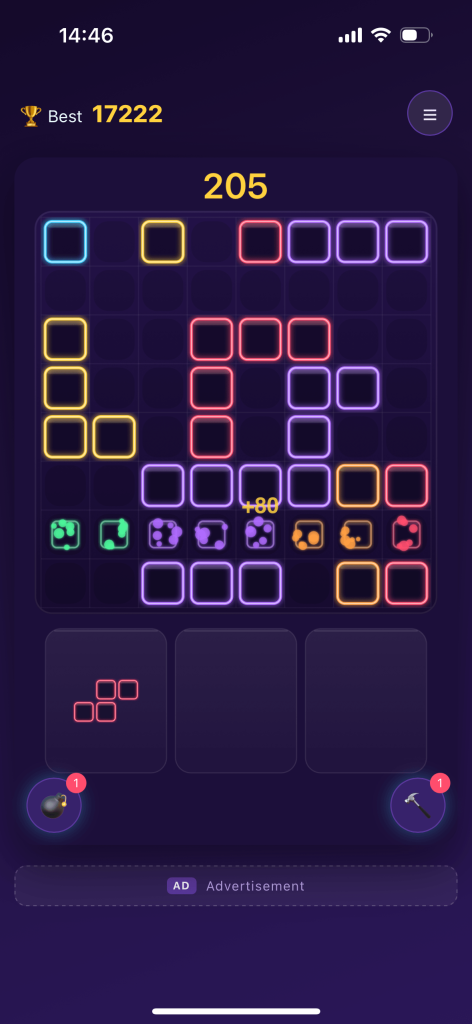
Quick Answers
| Question | Short answer |
|---|---|
| Is it free? | Yes, free to download and play |
| Are there ads? | Yes; a one-time purchase removes them |
| Is there a subscription? | No |
| Does it work offline? | Yes, fully playable without a connection |
| Is progress saved? | Yes, automatically on the device |
| Is there a timer? | No |
| Can you rotate blocks? | No |
| Grid size | 8×8 |
| Modes | Classic (endless) and Adventure (40+ levels) |
| Boosters | Bomb (3×3 area) and Hammer (single block) |
| Do I need an account? | No |
| Developer | Shenzhen Jinjie Network Technology Co., Ltd. |
Is Neon Block Blast Free to Download and Play?
Yes. Neon Block Blast is free to download from Google Play and free to play, including both Classic and Adventure modes. There is no paywall after a certain number of levels and no energy system that stops you from opening the game when you want to. The entire core puzzle, the grid, the shapes, the combos, the level progression and the boosters, is available without paying.
“Free” in this case means the familiar free-to-play arrangement: the game is supported by advertising, and there is an optional purchase for people who would rather not see ads. That is different from a trial, a demo or a limited free tier. You can play indefinitely without spending anything.
If you want to understand why we chose that structure rather than a subscription or an energy meter, the free puzzle games without subscriptions guide explains the reasoning in full. The short version: a casual puzzle that fits into a two-minute break should not require a recurring commitment.
Does Neon Block Blast Contain Ads?
Yes. Advertising is part of the free version. That is what makes the game free to download and play without a subscription, a paid unlock or a limited number of sessions.
We think it is better to be direct about this than to bury it, because ads are the single most common reason someone hesitates before installing a free puzzle game. The game is built around short, self-contained sessions rather than long uninterrupted ones, and the design keeps the puzzle itself, the grid, the tray and the scoring, entirely playable without a connection. The important thing for most players is that the advertising model is transparent and that there is a way out of it which does not involve a monthly bill.
What Does the One-Time Purchase Do?
The optional in-app purchase removes ads permanently. It is a one-time purchase, not a subscription and not a recurring charge. There is no ongoing payment, no renewal date and no account to manage afterwards.
That distinction matters more than it might sound. A subscription asks you to keep deciding whether a casual game is worth a monthly cost. A one-time ad removal asks the question once. For a game you might open for three minutes on a commute, the second arrangement is a much better fit. It also means the free version is not a degraded trial: players who never pay still get the full puzzle, both modes, offline play and autosave.
We do not quote a price here because prices can vary by region and change over time. The current figure is always shown on the official Google Play listing.
Can I Play Neon Block Blast Offline or Without Wi-Fi?
Yes. Neon Block Blast is fully playable offline, in both Classic and Adventure modes. You do not need Wi-Fi or mobile data to open the game, place blocks, clear lines, use boosters or work through levels. It is a practical choice for flights, underground trains, areas with poor signal, and any situation where you would rather not use data at all.
This is one of the reasons the game works so well as a short-break puzzle. A connection is not a precondition for playing, so there is no loading wall between deciding to play and actually placing the first block. If you are comparing games specifically for travel or commuting, our checklist for relaxing puzzle games with no timer and no Wi-Fi requirement covers what else to check before installing.
Offline play also means there is no server-side state to wait on between attempts. Restarts are instant, which is especially useful in Adventure mode where trying a different opening sequence is part of solving a level.
Is My Progress Saved Automatically?
Yes. Progress is saved on the device automatically, so you can close the app mid-board and come back to it. There is no manual save button and no account creation step. High scores in Classic and your position in Adventure persist without you having to do anything.
Because saving happens on the device, it is worth knowing the boundary: the save is local, not a cloud account. If you uninstall the app or move to a new device without transferring your data, a local save does not follow you. For a casual puzzle with no account requirement, that trade-off is usually welcome, but it is worth stating plainly rather than implying there is a sync feature that does not exist.
If you are the kind of player who likes to leave a board half-finished and return to it later, this works well. There is also no timer running while you are away, so an abandoned board is exactly as you left it.
Is There a Timer or a Move Limit?
No. Neon Block Blast has no timer. Nothing falls, nothing counts down, and nothing expires while you think. You can study the grid and the tray for as long as you like before committing to a placement, in either mode.
This is a deliberate design decision rather than an oversight, and we wrote a whole studio note on why the timer was left out. In a game about fitting shapes into limited space, a countdown does not add tension so much as it removes the part people came for: the chance to consider a move properly. It also makes the game easy to interrupt. A phone call, a station announcement or a colleague walking over does not cost you the board.
Adventure mode has levels and obstacle layouts, but no countdown. The constraint there is the board itself, not the clock.
Can I Rotate the Blocks?
No. Blocks arrive in a fixed orientation and cannot be rotated. The shape you are offered is the shape you must place.
This rule surprises people who come from falling-block games, where rotation is one of the basic controls. Here it is the opposite: the absence of rotation is what makes planning matter. A vertical three-cell piece cannot be turned sideways to slip into a horizontal gap, so you have to read the tray first and then choose a position that works for the shapes you actually have. It shifts the challenge from quick motor control to spatial reasoning.
It is also why the advice in our block puzzle tips guide puts so much weight on planning for the entire tray rather than one piece at a time. When you cannot change a shape, the only variable you control is where it goes.
How Does a Classic Run End?
A Classic run ends when none of the shapes currently available in the tray can be placed anywhere on the 8×8 grid. That is the only failure condition in endless mode. There is no clock reaching zero, no life counter and no opponent.
Everything else follows from that one rule. Full rows and columns are the only way to reclaim space, so every placement is a small bet on future space. Placing a shape in a corner “for now” tends to create awkward one- and two-cell pockets that later shapes cannot use. Protecting open rows, keeping the centre flexible and setting up a placement that completes a row and a column at once are all ways of delaying the moment when nothing fits.
Combos, earned by clearing multiple lines with a single placement, are the main way to push a high score upward. Boosters, earned by clearing lines, give you a way back from a crowded board. The Bomb clears a 3×3 area and the Hammer removes a single block. Neither changes the end condition; they simply give you more space to work with before it arrives.
What Is the Difference Between Classic and Adventure?
Classic is endless. The board starts empty, there are no levels and no targets, and your high score is the only opponent. You play until no shape fits, then start again. It is the mode most people open for a few quiet minutes.
Adventure is structured. It offers more than 40 handcrafted levels built around ice, wood and stone obstacles that you need to break through. Each level presents a board with a situation already in progress, so the question changes from “how long can I survive?” to “what sequence opens this layout?” The placement rules are identical in both modes.
Both modes are offline-capable, untimed, and part of the same free install. If you want the detailed breakdown of obstacles, boosters and how to approach a new level, the Adventure mode guide covers it. The exact objective of each level is shown in the game itself rather than in this FAQ.
What Do the Bomb and Hammer Power-Ups Do?
The Bomb clears a 3×3 area. It is an area tool, best used when a cluster of blocks and obstacles has formed in one region and no shape in the tray fits around it. The Hammer smashes a single block. It is a precision tool, ideal for removing the one stubborn cell preventing a row from completing, or carving out a gap that matches an awkward shape.
You earn boosters by clearing lines, which means playing well builds up your emergency options. The usual mistake is spending a Bomb on mild crowding, when the board still has legal placements. The better rule is to spend a booster when space runs out rather than when a score opportunity appears. In Adventure, where a level can hinge on one blocked cell, the Hammer is often the cheapest possible solution.
What Devices and Android Versions Does It Support?
Neon Block Blast is an Android game distributed through Google Play. The current minimum Android version, supported device details and any regional availability are listed on the official store page, and we recommend checking there rather than relying on a third-party summary, because those details change as the app is updated.
What we can say without qualification is that the game is lightweight enough to be comfortable on older phones and does not need a network connection to run. If storage space or an older device is a concern, the Google Play listing shows the current install size and requirements before you download.
If you arrived here from a link about a different “Neon Blast” game, check the package name: com.jinjie.neonblast. There are other apps with similar names that are entirely different games, including a roguelite shooter, and features from those should not be assumed to apply here.
Where Can I Read the Privacy Policy?
The developer’s privacy policy is published on the company site at https://www.ai-sp.cn/apps/neon-blast/privacy.html. It is also linked from the Google Play listing, which is the most reliable place to find the current policy for any installed app.
We mention it here because it is a reasonable question to ask before installing any free mobile game, especially one that includes advertising. If you are checking what data an app uses, the store listing’s data safety section and the developer’s policy page together are the right sources. This FAQ deliberately does not summarise or paraphrase the policy; read the published version itself.
How Do I Get a Higher Score?
Score comes from clearing lines, and clearing several at once is worth more than the same lines cleared separately. So the highest-leverage habit is setting up a placement that completes a row and a column simultaneously, or several lines at once, rather than taking every easy single clear immediately.
Beyond that: protect the centre of the grid, read all the shapes in the tray before placing any of them, avoid creating one- and two-cell pockets in corners, and keep at least one open row or column available for an awkward piece. Save the Bomb for a genuinely disconnected board and use the Hammer when a single cell is the bottleneck. Our ten block puzzle tips turns each of those into a concrete habit with examples.
There is no timer, so the single biggest advantage available to you is simply taking a few seconds to look at the whole board before every move.
Is It a Brain-Training App?
No. Neon Block Blast is a casual leisure puzzle game, not a medical or clinical brain-training product. It is not intended to diagnose, treat or prevent any condition.
That said, playing it does involve genuine spatial reasoning: holding several shapes in mind, imagining where they fit, and projecting how a placement changes the board a few moves later. If you are interested in that side of the genre, our article on block puzzles and spatial reasoning discusses what the format exercises and includes a clear note on the limits of such claims. We would rather be precise than overpromise.
Still Have a Question?
The fastest way to answer anything not covered here is to open the official Google Play listing, where the current description, requirements, pricing and data safety information are published, or to install the game and look at the mode select screen. Both modes, the boosters and the full level progression are available in the free version, so you can check anything yourself without paying.
For the complete picture of the game, read the Neon Block Blast review, which covers the rules, both modes, the boosters, the offline behaviour and the free-to-play model in one place.
Download Neon Block Blast on Google Play: https://play.google.com/store/apps/details?id=com.jinjie.neonblast
Further reading: games like Block Blast and how to choose an alternative and what defines a Block Blast-style 8×8 puzzle.
Views: 0